

Need a Safe Way to Understand a Private Instagram Account?
Use VigilKids Live View to see real-time screen activity — including Instagram feeds, profiles, and chats — when you're concerned about your child’s safety.
Instagram is where we keep little pieces of our lives — the fun, the messy, the meaningful. Here’s the honest part: Instagram’s privacy settings actually work. There’s no magic “view anyway” button, no secret trick that lets you slip in unnoticed. And that’s a good thing — people deserve control over what they share.
But that doesn’t mean you’re out of options. There are a few real, straightforward ways to see a private Instagram account (the kind Instagram actually allows), and there are also a bunch of shortcuts floating around online that sound clever… but mostly lead to disappointment, scams, or worse.
In this guide, we break it all down for you — what works, what doesn’t, and what to avoid completely.
- Table Of Contents
- PART 1. Can You Really View a Private Instagram Account?
- PART 2. Legitimate Ways to View a Private Instagram Account
- Method 1. Send a Follow Request
- Method 2. Ask a Mutual Follower
- Method 3. Password Reset (Family Members Only)
- Method 4. Request Account Memorialization
- PART 3. Workarounds People Often Try to View a Private Instagram Account
- Method 1. Create a Fake (Catfish) Account
- Method 2. “Mutual Help” or Middleman Accounts
- Method 3. Ask Followers of the Account (Outside Your Circle)
- PART 4. Methods You Should Avoid When Trying to View a Private Instagram Account
- Method 1. Third-Party “Private Viewer” Tools
- Method 2. Strangers Offering Help in DMs
- Method 3. Download Links or “Hacks”
- PART 5. Safe Alternatives If You Can’t View a Private Instagram Account
-
PART 6. Guidance for Parents Worried About a Child’s Private Instagram Account

PART 1. Can You Really View a Private Instagram Account?
Yes—and no. Instagram is built to protect private accounts, so there’s no magic trick or official tool that lets you bypass the system. Unlike public profiles, a private account’s photos, videos, and stories remain invisible unless you’re accepted as a follower.
That said, there are still a few legitimate pathways:
-
Sending a follow request directly
-
Asking mutual followers to share posts with you
-
Requesting access through account recovery (in family cases)
-
Memorializing the account (if the person has passed away)
If you weren’t following the account before it went private, you’ll need to rely on one of these methods. Anything else you see advertised online—“view private Instagram tools,” “secret apps,” or strangers offering help—falls into the scam category.
PART 2. Legitimate Ways to View a Private Instagram Account
Method 1. Send a Follow Request
This is the only direct way Instagram allows. When you hit the Follow button, the account owner will get a notification. If they approve, you’ll gain full access to their posts and stories.
Tips to increase your chances of being accepted:
- 1.Use a real profile picture (avoid blank avatars).
- 2.Add a short but genuine bio—explain your connection if appropriate.
- 3.If you know the person personally, send a polite message explaining why you’d like to follow.
Remember, the choice is entirely up to the account owner. If they don’t approve, you won’t be able to see their content.
Method 2. Ask a Mutual Follower
If someone you know is already following the account, you can ask them to:
- Show you posts directly on their device
- Share screenshots or saved photos
- Tag you in older memories if they were involved
This is especially useful if the account belongs to a deceased loved one—friends or family who followed them may already have access to the photos you’re looking for.
Method 3. Password Reset (Family Members Only)
In rare cases, if you’re a direct family member of the account owner (for example, after they passed away), you may be able to recover access by:
- Logging into the email used for the Instagram account
- Requesting a password reset through Instagram
- Providing necessary documentation to prove relationship
This isn’t always guaranteed, but it’s one of the few official ways to request access beyond a follow.
Method 4. Request Account Memorialization
For accounts of people who have passed away, Instagram offers a Memorialization option. Once memorialized:
- The account remains on Instagram permanently, marked as a memorialized profile
- No one can log into it, but existing followers keep their access
- Content stays preserved, though private posts remain hidden if you weren’t a follower
It won’t unlock hidden posts for you, but it ensures the account won’t be deleted and helps preserve digital memories.
PART 3. Workarounds People Often Try to View a Private Instagram Account
Even though Instagram doesn’t provide a back door, people on forums, Reddit, and social media often share “alternative” methods. These aren’t official, and while some may sound tempting, they come with serious risks. Let’s break them down.
Method 1. Create a Fake (Catfish) Account
This is probably the most common suggestion online. The idea is simple:
- Build a fake Instagram profile that looks real
- Upload believable photos (same person, consistent style, not stock images)
- Follow some of the target’s friends to appear trustworthy
- Then send a follow request to the private account
Why people try this:
They think it makes them more likely to be accepted than with their real identity.
Risks involved:
- If the person realizes it’s fake, you’ll lose trust permanently.
- Instagram may detect it as a catfish account and suspend it.
- Ethically questionable—it’s still deception.
Method 2. “Mutual Help” or Middleman Accounts
In many Reddit threads, people post comments like: “Give me the @, I’ll get in for you” or “Let’s help each other—follow mine and I’ll follow yours.”
Why people consider it:
It feels like a shortcut if a stranger claims they can help.
The reality:
- You’re trusting strangers with your personal situation.
- They may expose your request to the target account.
- In some cases, people reported being scammed or humiliated.
Method 3. Ask Followers of the Account (Outside Your Circle)
Some try messaging random followers of the private account:
- “Hey, I need to see a post, can you help?”
Possible outcome:
- Most loyal friends won’t cooperate, especially in sensitive situations like cheating or family disputes.
- You risk your request being screenshotted and sent back to the account owner.
⚠️ Important Note:
- While these methods get discussed a lot online, they are not reliable and can backfire. If you’re considering them, remember: you’re essentially taking risks with your identity, reputation, and trust.
PART 4. Methods You Should Avoid When Trying to View a Private Instagram Account
When searching online, you’ll inevitably come across “secret tricks” or apps that promise instant access to private Instagram accounts. These are almost always scams. Here are the most common ones to steer clear of:
Method 1. Third-Party “Private Viewer” Tools
Websites like peekviewer or random “Instagram private viewer apps” claim they can unlock any account for free.
The reality:
- Instagram’s encryption doesn’t allow these tools to work.
- Most are phishing sites designed to steal your login credentials.
- Others bombard you with fake surveys, malware, or endless ads.
If it sounds too good to be true, it is. No tool outside Instagram itself can bypass privacy settings.
Method 2. Strangers Offering Help in DMs
In Reddit threads, you’ll often see comments like: “DM me, I can show you private accounts.”
Why it’s dangerous:
- They usually demand payment or your personal details.
- At best, you lose money. At worst, your Instagram account gets hacked.
- Zero guarantee you’ll get what you want.
Method 3. Download Links or “Hacks”
Some posts share APK files or browser extensions claiming to unlock private accounts.
Risks include:
- Malware installation
- Stolen personal data
- Permanent compromise of your device security
⚠️ Bottom line:
- WAny service, app, or person claiming to “instantly view private Instagram accounts” is lying. Stick to safe methods, even if they take longer.
PART 5. Safe Alternatives If You Can’t View a Private Instagram Account
If you can’t gain access to the account directly, here are healthier, safer alternatives that can still help you move forward.
1. Talk Directly (If Appropriate)
Sometimes the simplest solution is communication.
- Send a polite message explaining why you’d like to see their posts.
- Be transparent—whether it’s for closure, family memories, or another personal reason.
- They may still decline, but at least you approached respectfully.
2. Focus on Mutual Connections
Instead of taking risks online, lean on people you already know:
- Friends or family who followed the account may still have screenshots or saved posts.
- Ask gently—you might discover content you’d never seen.
3. Request Emotional Closure
In situations like suspected cheating or a loved one’s passing, constantly chasing hidden content can drain your mental health. Alternatives include:
- Having an honest conversation with your partner
- Seeking support from trusted friends or family
- Preserving memories through shared photos or videos from others
4. Consider Professional Channels
For deceased relatives, Instagram offers:
- Memorialization: Keeps the account online in tribute form
- Official Support Requests: If you’re the legal next of kin, you may have limited account management options
These routes won’t bypass privacy but do protect the memory of your loved one.
PART 6. Guidance for Parents Worried About a Child’s Private Instagram Account
While most advice online focuses on general users, parents often carry an extra weight of responsibility: making sure their kids are safe online without pushing too hard on their privacy. The right approach is trust—backed by the right tools.
Start with simple conversations: Ask about who they follow, what they like posting, and what feels stressful online. Keep it casual. Most kids open up when they don’t feel judged. Remind them that things like random DM requests, suspicious links, or pressure to send photos are real issues, not “overreactions.”
Be transparent about your concerns: If you want to follow their Instagram, explain why. “I just want to make sure you’re safe” is very different from “I need to check on you.” Kids can tell the difference, and it usually lowers their guard.
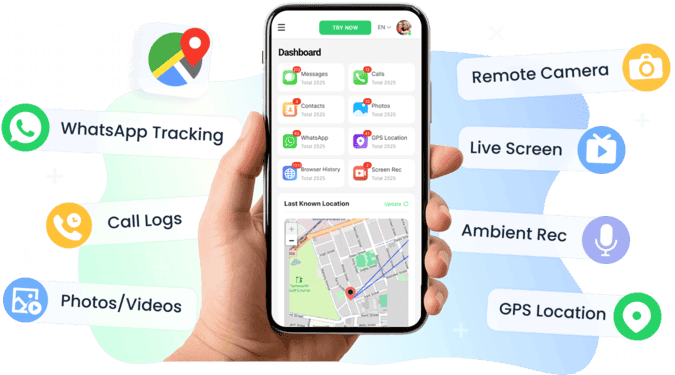
Use Supportive Tools like VigilKids: When open talk isn’t enough, VigilKids provides parents with a gentle but powerful way to stay informed:
- Get instant alerts if sensitive keywords appear in chats or searches
- Track app usage and set healthy limits for apps like Instagram or TikTok
- Review risky content with AI image detection to spot inappropriate material early
- Use real-time screenshots to understand what’s happening on your child’s phone—including hidden Instagram screens such as content feeds, follower lists, or even chat windows
- Live features like screen recording or surrounding audio for urgent situations, not day-to-day monitoring
Remember, Instagram is just one part of their world. Teens switch platforms faster than adults can download them. VigilKids puts everything in one place so you’re not constantly chasing clues across apps.<、p>
Conclusion
Viewing a private Instagram account isn’t easy — and that’s exactly how privacy is meant to work.
✔️ Safe ways: send a follow request, ask mutual followers, recover access (family cases), or request memorialization.
❌ Avoid: fake accounts, strangers offering “help,” third-party viewers, or suspicious DM links.
If access isn’t possible, let it go — your peace of mind matters more than forcing a peek.
For parents concerned about a child’s online safety, give VigilKids a try. It flags risky content, alerts you to sensitive keywords, and provides real-time screenshots on apps like Instagram — helping you stay informed without hovering.